

Running a WordPress website takes more effort than most people expect. Once the site is live, the real work begins: updating plugins, patching security vulnerabilities, running backups, checking page speed, and making sure nothing breaks along the way. It is a cycle that never really stops.
Now imagine doing all of that across five, fifteen, or forty websites. For UK-based freelancers, digital agencies, and growing businesses, this is not a hypothetical scenario. It is a daily reality. And it raises an important question: is there a smarter way to handle it all?
ManageWP is one of the most widely recommended answers to that question. But does it genuinely live up to the reputation? In this detailed ManageWP review UK guide, we will look at what the platform offers, where it excels, where it falls short, and whether it deserves a place in your WordPress workflow.
What Is ManageWP and How Does It Work?
ManageWP is a cloud-based WordPress management tool that allows you to control multiple WordPress websites from a single dashboard. Rather than logging into each site individually to run updates or check security, you connect all your sites to ManageWP and manage them centrally.
Setup is straightforward. You install a lightweight worker plugin on each WordPress site, then link it to your ManageWP account. Once connected, the dashboard gives you a bird’s-eye view of every site in your portfolio. You can run updates, schedule backups, perform security scans, and generate reports without opening a single wp-admin panel.
The platform runs on a freemium model. Core features, including the dashboard, one-click updates, and monthly backups, are completely free for unlimited sites. Premium add-ons cover more advanced needs like hourly backups, uptime monitoring, and branded client reports. You pay only for the features you use, and only on the sites where you need them.
Key Features of ManageWP
ManageWP bundles a wide range of WordPress maintenance tools into a single platform. Here is a closer look at the features that matter most.
Central Dashboard
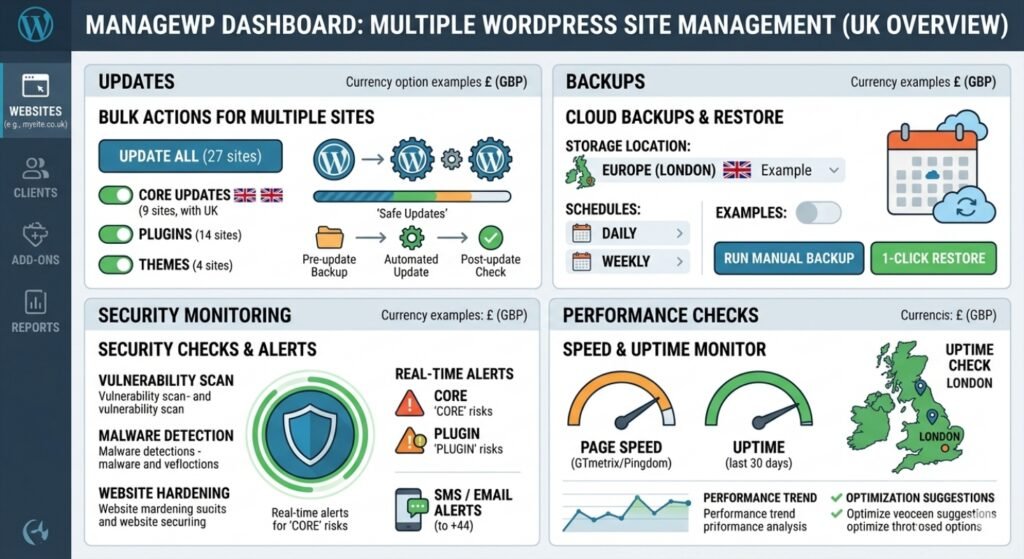
The dashboard is the foundation of the entire platform. Every connected site appears in an organised overview, showing pending updates, recent backups, security alerts, and overall site health at a glance. For anyone who manages multiple WordPress sites, this single-pane view eliminates the chaos of juggling separate logins and browser tabs.
One-Click Updates
Keeping WordPress core, plugins, and themes up to date is one of the most important maintenance tasks, and one of the most tedious when done manually across many sites. ManageWP lets you:
- Update everything across all sites with a single click
- Selectively update specific plugins or themes on chosen sites
- Preview available updates before applying them
- Create automatic restore points before each update
This feature alone saves considerable time, particularly for agencies handling large portfolios.
Automated Backups
The free plan includes monthly offsite backups for every connected site. Premium users can schedule backups as frequently as every hour and store them on services like Google Drive, Amazon S3, or Dropbox. One-click restore makes recovery quick and painless if something goes wrong.
Security Monitoring
ManageWP integrates with Sucuri to provide security scans that check for malware, blacklist status, and known vulnerabilities. While this does not replace server-level security, it offers a practical application-layer check that catches common threats before they cause damage.
Uptime Monitoring
The premium uptime monitoring add-on checks your sites at regular intervals and alerts you immediately if a site goes down. For businesses that depend on their website for leads or sales, knowing about downtime within minutes rather than hours can make a significant difference.
Performance Checks
Built-in performance monitoring measures page load times and highlights areas for improvement. It is not a replacement for tools like GTmetrix or Google PageSpeed Insights, but it provides a quick, consistent benchmark across all your sites from one place.
Client Reporting
This premium feature is particularly valuable for freelancers and agencies. ManageWP generates professional, branded reports summarising the maintenance work completed on each client’s site. Reports can be customised with your own logo, scheduled to send automatically, and delivered via email. It is a small touch that builds trust and demonstrates ongoing value to clients.
Why ManageWP Is Popular in the UK
ManageWP has built a strong following among UK-based WordPress professionals, and it is not difficult to see why.
Cost sensitivity matters. UK freelancers and small agencies often work with tight margins. ManageWP’s free tier and modular pricing let them deliver professional maintenance services without heavy upfront investment. You can start with zero cost and add premium features only as client revenue justifies the spend.
The UK freelance market is growing. More WordPress developers across the UK are offering ongoing maintenance packages alongside design and development work. ManageWP gives them the tooling to scale that side of their business without hiring additional staff or spending evenings on manual updates.
GDPR awareness plays a role. UK website owners are acutely aware of data security obligations. ManageWP’s security scanning and backup features provide a baseline level of protection that aligns with the need to keep sites secure and recoverable, something that matters when personal data is involved.
Remote and distributed teams benefit. With many UK agencies operating with remote or hybrid teams, a cloud-based dashboard that any authorised team member can access from anywhere simplifies collaboration and task delegation.
Pros and Cons of ManageWP: A Balanced View
Pros
- Generous free plan that genuinely covers core management needs for unlimited sites
- Hosting-agnostic design that works with any provider, from budget shared hosting to premium VPS setups
- Modular pricing so you never pay for features you do not use
- Bulk operations that save hours of repetitive manual work every week
- Client reports that add professionalism and transparency to maintenance services
- Intuitive interface with a minimal learning curve
Cons
- No hosting included. ManageWP is a management layer, not a hosting solution. You still need to source and pay for hosting separately.
- Limited server-level control. It cannot optimise your server stack, configure caching at the infrastructure level, or fix hosting-related performance issues.
- Support could be stronger. There is no phone support or live chat on the free plan. Premium users have email support, but response times can vary.
- Security is application-level only. Scans catch malware and vulnerabilities, but there is no server-side firewall, DDoS protection, or deep intrusion detection.
- Requires proactive management. Automation handles the routine, but you still need to monitor alerts and make decisions. It is not a fully hands-off solution.
ManageWP vs Managed WordPress Hosting: A Quick Comparison
This is a common point of confusion, so it is worth addressing directly. ManageWP and managed WordPress hosting solve overlapping but different problems.
ManageWP is a tool you layer on top of your existing hosting. It centralises management tasks, automates updates and backups, and gives you a dashboard for oversight. It does not touch your server environment.
Managed WordPress hosting (providers like WP Engine, Kinsta, or Cloudways) bundles hosting with maintenance. Your server is optimised specifically for WordPress, and the provider handles core updates, security, caching, and support. The management is built into the hosting itself.
If you run a single high-traffic site and want a completely hands-off experience, managed hosting is likely the better fit. If you manage multiple WordPress sites across different hosts and need centralised control at a lower cost, ManageWP is the more practical choice. Many UK professionals use both: managed hosting for their most critical sites and ManageWP to tie everything together across the full portfolio. You can explore more about choosing the right WordPress hosting for your needs to understand how these options complement each other.
Real-World Use Cases in the UK
Freelancers
A freelance web developer based in Manchester managing 12 client sites can use ManageWP’s free plan to handle all updates and monthly backups centrally. Adding client reports at £1 per site per month turns routine maintenance into a visible, billable service. Total management cost: under £15/month for the entire portfolio.
Digital Agencies
A London-based agency with 60 client websites across various hosting providers uses ManageWP to standardise maintenance workflows. Bulk updates run in minutes instead of hours. Premium backups protect client data daily. Branded reports go out automatically each month. The team focuses on strategy and development instead of chasing plugin updates, and the agency can explore scaling WordPress maintenance as a service offering with confidence.
Small Business Owners
A small e-commerce business in Birmingham running two WordPress sites, one for the shop and one for the blog, uses ManageWP’s free tier to keep both sites updated and backed up. The owner is not technically advanced, but the dashboard is simple enough to check weekly without confusion. It provides just enough oversight without requiring deep technical knowledge.
Pricing Overview and Value for Money
ManageWP’s pricing is one of its strongest selling points, particularly for the UK market where value for money is a key consideration.
- Free plan: Central dashboard, one-click updates, monthly backups for unlimited sites
- Premium backups: From approximately $2 (around £1.60) per site/month
- Uptime monitoring: Approximately $1 (around £0.80) per site/month
- Client reports: Approximately $1 (around £0.80) per site/month
- Performance checks: Approximately $1 (around £0.80) per site/month
- SEO ranking: Approximately $1 (around £0.80) per site/month
Even with every premium add-on activated, the total cost per site typically stays under £5/month. Compare that to managed hosting plans that start at £20 to £80+ per site, and the value proposition becomes very clear. For freelancers and agencies charging clients £30 to £100/month for maintenance packages, ManageWP provides the tooling at a fraction of the fee, leaving healthy margins.
Is ManageWP the Best Choice for You?
Whether ManageWP is the “best” tool depends entirely on what you need and how you work.
ManageWP is an excellent choice if you:
- Manage multiple WordPress sites and need a centralised dashboard
- Want to automate routine maintenance without changing your hosting
- Offer WordPress maintenance as a service and need client-facing reports
- Prefer a modular, pay-for-what-you-use pricing model
- Are comfortable making your own decisions about updates and security
It may not be the best fit if you:
- Run a single site and want a fully managed, hands-off experience
- Need server-level performance optimisation and advanced security infrastructure
- Require 24/7 phone support for emergencies
- Prefer everything, hosting and management, bundled into one provider
For the majority of UK freelancers, agencies, and small businesses managing WordPress sites, ManageWP is one of the strongest WordPress maintenance tools UK professionals can add to their toolkit. It does not do everything, but what it does, it does reliably, affordably, and at scale.
Conclusion
ManageWP has earned its reputation for good reason. It solves the most time-consuming and error-prone aspects of WordPress maintenance and packages them into a clean, affordable, and genuinely useful platform. For UK-based professionals managing multiple sites, it offers a level of efficiency and control that manual management simply cannot match.
Is it the single best tool for every scenario? No. High-traffic sites with complex infrastructure needs may still benefit from dedicated managed hosting. But for the vast majority of WordPress professionals working across multiple client sites, ManageWP delivers outstanding value and deserves serious consideration.
If you have not tried it yet, start with the free plan. Connect your sites, run a few bulk updates, and see how much time you save in the first week. That experience will tell you more than any review ever could.
Frequently Asked Questions
Is ManageWP suitable for beginners?
Yes. The interface is clean and intuitive, and the free plan provides a low-risk way to get started. You do not need advanced technical knowledge to use the dashboard, run updates, or schedule backups. It is designed to be accessible to anyone comfortable with basic WordPress administration.
Does ManageWP comply with UK data protection requirements?
ManageWP uses encrypted connections and stores backup data on secure offsite servers. While it supports good security practices, compliance with GDPR and UK data protection law depends on your broader setup, including your hosting provider, privacy policies, and how you handle personal data. ManageWP is a helpful part of the picture, but it is not a compliance solution on its own.
Can I use ManageWP with UK-based hosting providers?
Absolutely. ManageWP is hosting-agnostic and works with any provider, including popular UK hosts like 20i, Krystal, TSOHost, and others. As long as your site runs WordPress and allows plugin installation, it will connect to ManageWP without issues.
How does ManageWP compare to MainWP?
Both platforms serve similar purposes, but they work differently. ManageWP is a cloud-based SaaS platform with a freemium model. MainWP is a self-hosted solution where you install the dashboard on your own WordPress site. ManageWP is generally easier to set up and requires no server resources of your own, while MainWP appeals to users who prefer full self-hosted control. The best choice depends on whether you value convenience or complete data ownership.
Is ManageWP worth paying for, or is the free plan enough?
For many solo site owners, the free plan covers the essentials comfortably. If you manage client sites professionally, the premium add-ons for daily backups, uptime monitoring, and client reports are well worth the modest investment. At under £5 per site per month for the full premium stack, it pays for itself quickly through time savings and improved client retention.